Popular Posts

Showing posts with label mobile. Show all posts

Thursday, March 19, 2009

Mobile Battery Tips

If your mobile battery is troubling you in between your work and you feel like throwing away your set, then try these tips , they might be useful .

Reserve battery: Nokia instrument comes with a reserve battery. To activate, press the keys *3370# Your cell will restart withthis reserve and the instrument will show a 50% increase in battery.Thisreserve will get charged when you charge your cell next time.

Turn Down Screen Brightness: The screen is one of the most power-consuming parts of the mobile phone. The lower the brightness, the lesser power it needs. Keep it as low as you can, so long as you can still see it! Also, some phones like the E61 and the BlackBerry Pearl come with auto-adjust features that increase the brightness in brightly lit areas and dim it in low-light areas. If you're setting the brightness low, make sure that auto-adjust is turned off.

Don't Use Animated Wallpapers or Screensavers: The animations in wallpapers and screensavers can drain a bit of battery as they also consume a wee bit of CPU. Turn them off.

Turn Off Keypad Lights: If you've been using the phone for a while, you may be able to use the keys without seeing them. If this is the case, the keypad backlight can be turned off. However, not a lot of phones support this, but it's worth considering if your phone does.

Decrease Screen Standby Time Out: The time till your screen dims out and/or gets turned off is configurable in most phones. 10 seconds is good, 5 seconds is better. Set it as low as you can go without it becoming inconvenient.

Close Background Applications: If you're using a Smartphone, close applications that you don't need. Applications that stay active in the background use up a bit of CPU, which uses up battery. Make sure you 'exit' the applications from the menu, not by pressing the 'End' key, as that merely puts the application in the background. In Series 60 Smartphones (mostly Nokias), hold down the 'Menu' key to get a list of all applications running in the background to close them. In Windows Mobile 5 phones, open the 'Memory' application and check the 'Running programs' tab to close them.

Turn Off Vibration: Probably the second most power-consuming feature of any mobile phone is the built-in vibration alert. See if you can do without it.

Turn Down Ringer Volume, Keypad Tones and Speaker During Calls: If you're mostly indoors, like in the office or at home, a low ringer volume can go a bit towards saving your battery. Most phones also have DTMF-like keypad tones, which are not necessary if the keypad has decent tactile feedback. I keep them turned off most of the time — you can try it too. Volume of the earpiece when you're on a call can also be lowered, and that helps too.

Disable Voice Clarity / EFR / Voice Privacy: Almost all phones now do Enhanced Full Rate (EFR) for voice communication that consumes a little more power. In most cases, the enhanced quality of EFR doesn't make a difference thanks to the high noise levels in our city. Keep it off, you probably won't miss it. Some phones (mostly Samsungs) have a 'voice privacy' feature which can also be turned off to save battery.

Turn off 3G / GPRS / EDGEMost 3G/UMTS/WCDM: A phones keep searching for 3G coverage by default. In India, they'll keep searching till 2008, draining your battery, so go to the network selection screen and choose GSM-only. If your phone has a secondary camera near the screen, it's a 3G phone. Check your phone’s specs on the website if you aren't sure. Sometimes, even regular GPRS or EDGE connections stay active in the back, so make sure you specifically disconnect when you're done browsing the web.

Use Bluetooth and WiFi Only While Transferring: If you only use Bluetooth occasionally to transfer files to and from other devices, there's probably no point keeping it on all the time. Most phones only come with an on/off setting for Bluetooth, unlike the 'Turn on for 10 minutes' setting available for Infrared in some phones (mostly Sony Ericssons). People tend to forget about Bluetooth being left on after transferring the file — avoid doing this. Same goes for WiFi, if you're phone has that.

Here's another tip — find a USB cable if your phone supports recharging via USB: The Motorola RAZR/KRZR/SLVRs and most Windows Mobile Smartphones have a standard miniUSB slot that can use the same cable as most digital cameras. You're more likely to find one of these lying around somewhere than a charger for your phone, unless it's a Nokia, of course.

Finally, if you've tried everything else above then the only remedy will be don't use the phone too much.

Nokia Secret Codes/Hacks

These codes for the Nokia series of phones provide some interesting information for users, they also unlock some hidden functions. These codes are often reffered to as "Nokia Secret Codes" or "Nokia Hacks". Use the codes at your own risk, not all Nokia phones support all codes, I have tried to split them into these groups.

These 3 codes work on 90% of Nokia phones;

*#06# n/a Display the IMEI (Standard GSM command, works on all phones)
*#0000# n/a Display the firmware version and date
*#92702689# *#war0anty# Here you can view the S/N and the IMEI as well as the life timer (newer models). The date the phone left the factory and the date it was purchased. If your phone has been repaired the date of the repair is also visible. You will need to turn the phone off to exit this menu. Newer phones simply require you to press ok.

The following codes are specific to older series 40 phones; (Entering the following codes will restart the phone)

*4720# (*hra0#) Cctivates Half Rate, Half Rate is 5.6kbit/s and uses half the bandwidth at the cost of call quality. Network operators often activate half rate on overloaded towers during peak times to save costs.
#4720# (#hra0#) Deactivates Half Rate
*3370# (*efr0#) Activates Enhanced Full Rate, EFT attempts to match wire quality. The calls are 12.2kbit/s and are not supported by all operators. It is compatibale with the hightest AMR mode.
#3370# (#efr0#) Deactivates Enhanced Full Rate
*#746085685# (*#sim0clock#) Display the SIM clock status

The following codes are phone specific or phase related;

*#7220# (*#pca0#) Activate the GPRS PCCCH support (Packet Common Control Channel)
*#7230# (*#pcd0#) Deactivate the GPRS PCCCH support
*#7760# (*#ssn0#) Display the manufacturing serial number

This only works on the 3310 and 3330;

*#67705646# (*#opr0logo#) Clear the operator logo, the logo will be reset to the default network operator logo.

The following codes work on newer series 40 & series 60/80 phones;

*#2820# (*#bta0#) Display the Bluetooth MAC address (Phone must have a built in bluetooth adapter)
*#7370925538# (*#res0wallet#) Reset the mobile wallet (Phone must have the mobile wallet feature)
*#7370# (*#res0#) Soft-format the memory (Symbian)
*#7780# (*#rst0#) Reset to factory defaults, confirmation required (also known has a Hard-format), all phone contents will be wiped clean including contacts and smses if they are stored on the phone

If you have any other codes or tips please do not hesitate to forward them to me and I will add them here.


Friday, March 6, 2009

Transform You Cell Phone to A Box to Play

The cell phone market has reached a stage wherein all the manufacturers are vying for their own pace. Today phones are not just phones but something beyond. Like the new phone that is a resultant of KDDI; this concept phone normally can be used as a phone, however the same unfolds to become a music jukebox. It’s is as simple as that and when folded looks all set to be a jazzy phone. So the next time if one feels that they are out of options to organize a small private party, just flip out your phone and be the party starter !

phone box to play

phone box to play

phone box to play

phone box to play

phone box to play

phone box to play

phone box to play


Designer : KDDI

Video Phone Concept By : Sony Ericsson

The challenge of the design brief was to create a design solution that enabled greater and easier levels of user interaction. The easy to understand keypad combined with the hand-writing recognition technology provides great information ergonomics for the user. Another of the video phone key selling points is its dual mode functionality. The phones keypad can be locked into place to provide a sturdy stand/rest to allow users to sit back enjoy the video calling experience.

sony ericsson video phone concept

sony ericsson video phone concept

sony ericsson video phone concept

Designer : Anthony Mapstone


New Walkman Phone by Sony Ericsson

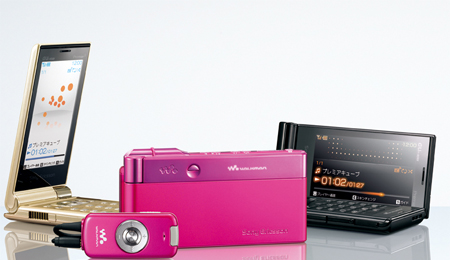
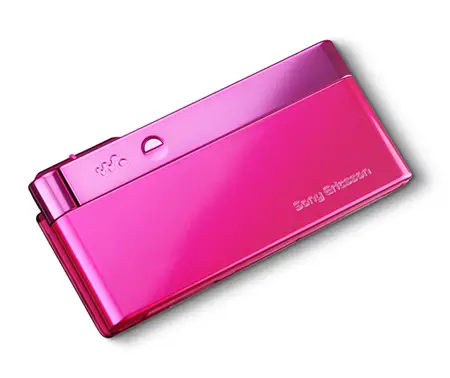
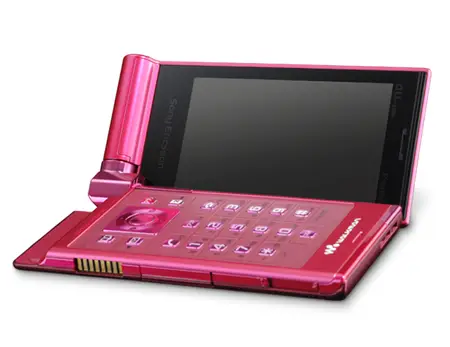
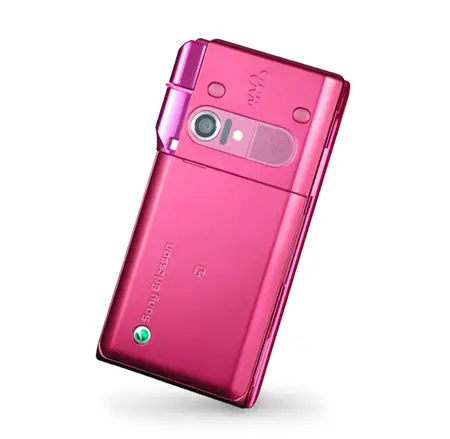
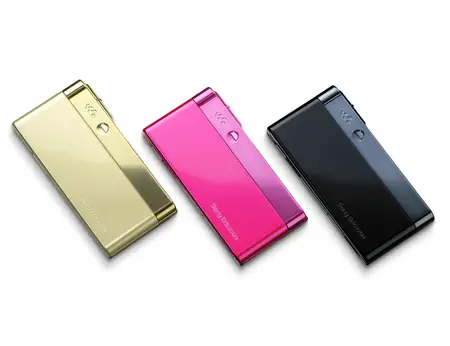
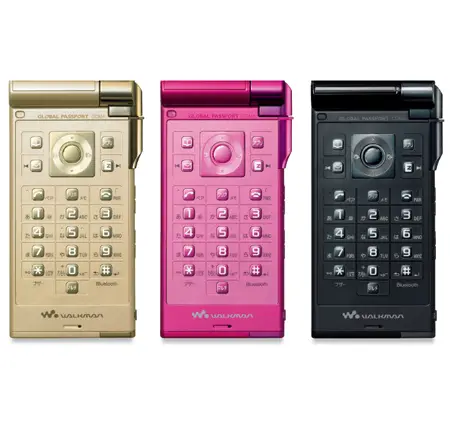
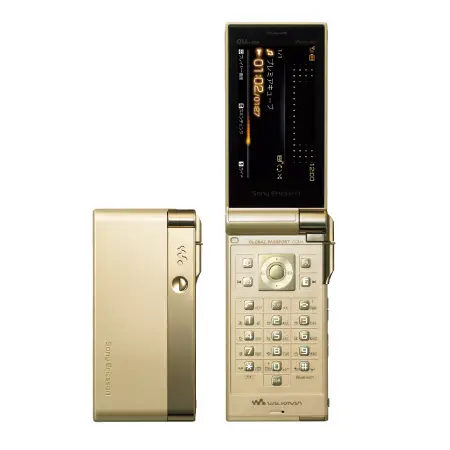
The cell phone market over the years has turned out to be a segment with the least shelf life, thereby a constant process for manufacturers to come up with new models. Today cell phone is not just an instrument to make and receive calls but far beyond that. The new walkman phone Premiere 3 by KDDI for Sony Ericsson, slated for spring release is a powerhouse so to say. It features a 3″ VGA screen, auto focus camera, and a memory of 2GB and weighing a meager 113gms, and quite compact in size. The colors are quite vibrant and with video in demand feature and also remote control for walkman, it sure is a model to look out for. There’s no info on pricing yet.

sony ericsson premiere 3 walkman phone

sony ericsson premiere 3 walkman phone

sony ericsson premiere 3 walkman phone

sony ericsson premiere 3 walkman phone

sony ericsson premiere 3 walkman phone

sony ericsson premiere 3 walkman phone

sony ericsson premiere 3 walkman phone

Designer : KDDI

Blue Earth : Samsung Mobile Phone

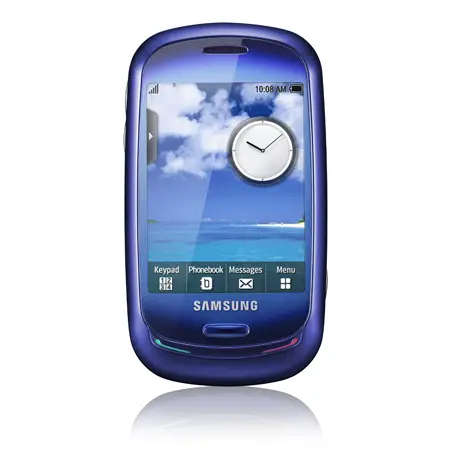
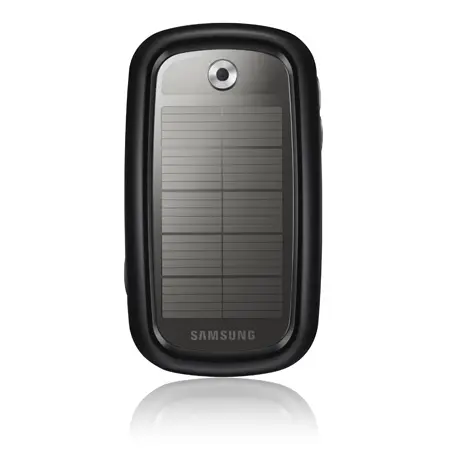
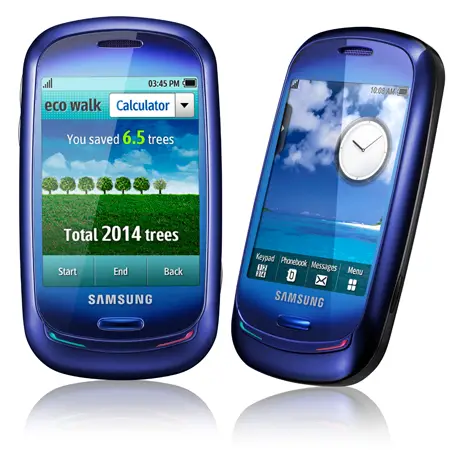
Blue Earth is the first solar powered full touch screen cell phone which beautifully designed by Samsung. By charging with the solar panel located on the back of the phone, users can generate enough electronic power to call anytime anywhere. This cell phone is made from recycled plastic called PCM, which is extracted from water bottles, helping to reduce fuel consumption and carbon emissions in the manufacturing process. Samsung Blue Earth mobile phone and the charger are free from harmful substances such as Brominated Flame Retardants, Beryllium and Phthalate.

samsung blue earth cell phone

samsung blue earth cell phone


“Samsung’s ‘The Blue Earth Dream’ demonstrates our small but meaningful commitments for the future and our environment. We are committed to achieving the highest eco-status with our customers and business partners by providing the best eco-products and promoting eco-activities.”

samsung blue earth cell phone

Designer : Samsung

Motorola Nest : New Mobile Phone


Motorola Nest is a mobile phone design by Kelly Bremer that is unique and equipped with multiple features. It’s a phone through which you can stay in touch with your loved ones as it has a built in application which is specially designed for people who wants to stay in touch with their family members always. It acts like a virtual scrapbook for the user through which the user can always interact with the people in his network. The user first of all has to create a group of people. Then he/she can use this phone by adding these people in the Motorola nest network.

Thursday, March 5, 2009

Transparent Crystal phone Concept


Here is something new that we haven’t seen before, a concept phone which is completely transparent and see through.

This concept phone by BloodRabbit which he thought of while driving home from work.
This mobile phone comes in a see-through body and a basic LCD display, sharing the same dimensions as a credit card.


Although you’re probably scratching your head and wondering how the electronics and other stuff like a battery and camera fits in.
we have to go by the assumption that technology in the future will be able to compress electronics to such a size.

GoldVish: World’s most expensive mobile phone reaches Russia

Euroset continues expanding its Luxury-line, within which it has imported the most expensive handset costing 1 mln. euros to Russia. Thus, the Russians can now buy GoldVish Piece Unique put into the Guinness Book of Records. Only three people on the planet have such a handset.

GoldVish Luxury-handsets have come to Russia. Expanding its Luxury-line Euroset has received the exclusive right to sell the entire GoldVish model range in Russia. Currently the handsets are available in Euroset three shops in Moscow. In 2008 the retailer plans to open GoldVish boutique in Moscow.

GoldVish Switzerland handsets made of 18 carat gold (of pink, yellow and white colors) and decorated with diamonds of highest quality WS1 cost from 22 to 127 thousand euros. Besides, the Russians will have the opportunity to buy the most expensive handset put into the Guinness Book of Records. GoldVish Piece Unique costs 1 mln. euro. GoldVish design has been developed by Emanuel Gueit, who has also designed a range of models for watches and jewelry.

Only three people on the planet have such a handset. Evgeny Chichvarkin, Euroset CEO, tells CNews one of GoldVish Piece Unique owners is Russian. However, rumors are circulating that all GoldVish Piece Unique owners are Russian.

Mr. Chichvarkin hopes that GoldVish will find its buyers in Russia. Commenting on possible demand for excessively expensive phones in Russia, he says that the Russian market might be compared to China, Abu Dhabi and Dubai. He says it is impossible to demonstrate GoldVish Piece Unique to the Russians, but they can easily order and acquire it in Euroset.


Vertu Boucheron Worlds Hottest New Phone


This is probably the world's hottest new phone and Vertu's most beautiful ever made! It is the creation of Vertu for Parisian jewellry house Boucheron, with the occasion of the 150th Anniversary.

“The essence of the single edition Vertu Boucheron 150 was to create something unique with signals of both brands,” said Frank Nuovo, Vertu Principal Designer. “Using the Vertu Signature platform, but taking it away from the core design and creating a visibly stunning statement that breaks all expectations of mobile phone design, resulting in a true piece of sculpture. The constantly changing angled surfaces allow a cut stone appearance, inspired by the clearly faceted stones which are a significant part of Boucheron’s core craft. The recognisable Vertu V shape has seemingly morphed into random proportioned patterns and directions of the three sided surfaces creating a perfect blend of Vertu and Boucheron elements. The challenge was to gain visual sparkle not from precious stones but instead through pure form and line achieved with precious faceted metal.”

Vertu Boucheron Worlds Hottest New Phone

Vertu Boucheron Worlds Hottest New Phone

Vertu Boucheron Worlds Hottest New Phone

Vertu Boucheron Worlds Hottest New Phone

Vertu Boucheron Worlds Hottest New Phone

Saturday, February 21, 2009

Nokia Mobile Games for downloading

Here few more Nokia Mobile Games for downloading. You may enjoy downloading all.

Download link is here - NOKIA GAMES

Monday, February 9, 2009

Callsinfo : A Smartphone Application to get call record.

CallsInfo is a Symbian mobile phone application or rather a smartphone application. Callsinfo is a Call logs application which breaks the monotone way of getting the calls details in a S60 phone.

* First application which analyze outgoing calls and incoming calls graphically.
* First application which provides a detail about with whom you have talked maximum.
* First application which provide you detail about your bill.
* Know how much sms you have sent to which number.
* Detailed analysis of Incoming, Outgoing and sms.
* Know your expected expenditure without contacting the operator.

Main feature:
  • With this application you can also keep an eye on the number to which you have talked maximum.
  • You can also store your call rates in the application and this application will automatically calculate the bill for you.
  • You can also know the information like how many SMS have sent to each number.
  • CallsInfo memorizes your calling pattern of each month and can estimate your future expenditure on the basis of the data it collects.

SLICK : A MULTI-MESSANGER FOR MOBILE

SLICK : A MULTI-MESSANGER FOR MOBILE : DOWNLOAD FROM HERE

Slick is a mobile phone instant messenger which allows you to chat with your friends. Not only this but you can also connect to your online messenger through slick as it provides a multi-IM environment. However a public alpha release is available which is available free of cost.


Main features are as ;

  • Its supports multi protocol environment including the support for all the major clients such as ICQ, Yahoo, AIM, MSN, Google Talk, Jabber. There is very little or approximately zero probability that you will have your account beyond these clients.
  • It also supports the file transfer facility which is indeed very important these days.
  • Not only you can send the IMs to all you online friends and buddies but you can also send them offline messages and they will receive the messages when they come online next time.
  • It also provides the emoticons feature and Alerts like sound, backlight, vibration, notify window displaying the number of new messages.
  • You can also send messages to individual user or you also have the option of group messaging.

Thursday, February 5, 2009

Unlock your Nokia Mobile Phone

Sometime, we need to lock our phone set or we need to format our mobile phone.Have you ever encountered the situation when you may want to just lock your phone or you may want to format your phone ? if yes then this post is for you. Here we will give below some tips for NOKIA MOBILE SET to unlock and format it.

NOTE: The default security code for all Nokia handsets is 12345.

There are three ways through which you can unloack your nokia phone without knowing the security code.

Method 1. Try the default security code i.e 12345 for all nokia phones.

Method 2. Download the java software from here and install it on nokia java based symbian phone.

Method 3. You can also unlock your nokia phone directly over internet by “Enter your phone IMEI number” by typing the code in the brackets (*#06#) from this website .

Hope this trick will work for you. Please leave your comments.

Tricks and Codes for Symbian based Nokia Mobile Phone

There are some new technology related open operating system called Symbian based OS. The main features are as;

Symbian OS was built to follow three design rules: the integrity and security of user data is paramount, user time must not be wasted, and all resources are scarce. This led to the writing of a microkernel, a request-and-callback approach to services, the concept of separation between UI and Engine (the business logic of a Symbian application). The OS is optimised for low-power battery-based devices and for ROM-based systems (e.g. features like XIP and re-entrancy in shared libraries). Applications, and the OS, follow an object-oriented design.

Symbian is not open source software yet. However, phone manufacturers and other partners are provided with parts of its source code. The APIs are publicly documented and up to Symbian 8.1 anyone could develop software for Symbian OS.

The common series of Nokia for this kind of OS are
Below giving some tricks and code for this kind of symbian based Nokia model.

To know the IMEI (International Mobile Equipment Identity) No.: *#06#
To check the phones Software revision. *#0000#
To enter the service menu type. *#92702689#
Clock Stopping. *#746025625#

#06# Display the IMEI (GSM standard)
*#0000# Display the firmware version and date
*#bta0# Display the Bluetooth MAC address (models with build-in Bluetooth radio, activate first to show address)
*#mac0wlan# Display the WLAN MAC address (models with build-in Wi-fi radio)
*#opr0logo# Clear the operator logo (3310 and 3330 only)
*#pca0# Activate the GPRS PCCCH support (early GPRS models)
*#pcd0# Deactivate the GPRS PCCCH support (early GPRS models)
*#res0wallet# Reset the mobile wallet (models with mobile wallet)
*#res0# Soft-format the memory (Symbian models only)
*#rst0# Reset to factory defaults, confirmation required (DCT4 or newer)
*#sim0clock# Display the SIM clock status (DCT3 only)
*#ssn0# Display the manufacturing serial number (mid-range and premium, non-Symbian models, and those devired from them)
*#war0anty# Display the manufacturing and repair info (no exit on DCT3)
*efr0# Enable EFR encoding (pre-2003 models)
#efr0# Disable EFR encoding (pre-2003 models)
*hra0# Enable HR encoding (pre-2003 models)
#hra0# Disable HR encoding (pre-2003 models)
#pw+1234567890+n# Display the SIM lock status: (pre-2003 models)
n = 1: provider lock
n = 2: network lock
n = 3: country lock
n = 4: SIM lock

Mobile and Laptop Batteries Regain : Tips

How To regain the original increased backup time for your laptop and phone batteries.

We always face such problem with our Laptop and Mobile Batteries i.e. the charge is loosing continuously after using regularly for few days.

Its just simple and very easy to regain batteries following few steps as ;

1. Firstly drain your phone or laptop battery completely until the device gets shutdown due to battery.

2. Now simply charge your battery for a fixed time according to the manuals provided with it at the time of purchase.

3. Repeat the step 1 and step 2 for about 2 times a day fro 3-4 days.

If you really do the steps given above you will noticeably see a change in the backup time of your battery of phone or laptop.


HOME : SHARE YOUR IDEAS